
Managing Users and Their Permissions
Along with separating your teams into departments, you can also control what each person can see and do by choosing their permission level.
You’ll find everyone in your account — and the control to change any of their permission levels — on the team management page, under Team in the left-hand menu. It is visible to admins.
There are 4 Permission Levels in Manifestly –
- admin
- user
- member
- limited
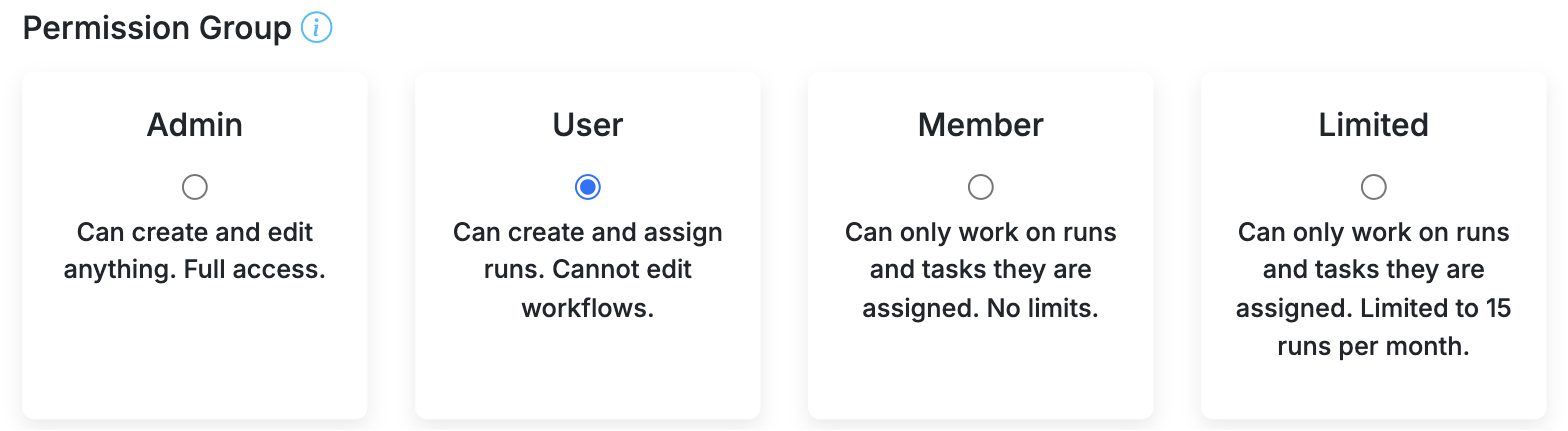
Two other things shape what a person can do. Guests let you bring in someone outside your organization for a single run. And where an Admin sits matters: an Admin in your Master Department has authority over the whole account. Both are covered below.
Admin
People with this permission have the ability to do everything in the departments they are in.
Counts toward your subscription.
Master Admins
An Admin’s reach depends on which department they sit in. An Admin in your Master Department — a Master Admin — has authority over the whole account rather than over a single department.
On top of everything an Admin can do, a Master Admin can:
- Create and delete departments
- Change your subscription, seats, and billing details
- Set up single sign-on (SAML and Google)
- Create API keys and review API request logs
- Connect or remove the Slack integration
- Manage business calendars and webhook signing secrets
- Change account-wide settings
An Admin who is not in the Master Department has full control of the departments they belong to, and none of the abilities above.
More on that department and who belongs in it: Understanding the Master Department in Manifestly
User
Can view workflows (within the departments they’ve been added) and start runs. They can assign people to runs and can set due dates on steps and runs.
They cannot create or edit workflows. They cannot add new users to the account.
Counts toward your subscription.
Member
Can only work on the runs they have been added to. They can’t browse your workflows, start new runs, or assign work to anyone else, and they can’t see your other runs, your users, or any account settings.
Member is the right choice for someone who only ever does work that is handed to them, but does it regularly — there is no limit on the number of runs a Member can be added to.
Counts toward your subscription.
Limited
A Limited user can do exactly what a Member can do: work on the runs they have been added to, and nothing else. They cannot start runs or assign runs and steps to other people. The difference between the two is volume and cost.
- Limited users are free. You can have an unlimited number of them and they don’t count toward your subscription.
- Limited users are capped at 15 runs per month. Members have no such cap.
Limited is the usual choice for occasional staff, virtual assistants, and other regular helpers who sign in from time to time to do work you have assigned to them. If someone keeps bumping into the monthly cap, move them to Member.
More detail: What is a ‘Limited’ user?
Guest
A Guest is for people outside your organization — clients, contractors, auditors — who need to see or complete steps in one specific run.
- Guests never sign in. You share a private link and they click it. There is no password and no account to set up.
- A Guest belongs to a single run. They cannot see any of your workflows, your other runs, your users, or any settings. The link works while that run is in progress, and stops working once the run is completed, closed, or archived.
- Guests are free and don’t count toward your subscription.
You add a Guest from inside the run itself, alongside the list of people already participating, and then share the link it gives you.
More detail: Guest Users
Which one should I choose?
- They build and change your processes → Admin
- They run your processes but shouldn’t edit them → User
- They only do work assigned to them, and often → Member
- They only do work assigned to them, now and then → Limited
- They’re outside your company and need one run only → Guest
- They administer billing, single sign-on, or departments → Admin in the Master Department
Hiding steps from Members, Limited users, and Guests
By default, everyone added to a run can see all of its steps. A workflow setting (or a setting on an individual run) restricts Members, Limited users, and Guests to only the steps they are assigned — Admins and Users continue to see every step.
More detail: What Limited, Member, and Guest users see in a run
Changing someone’s permission level
Permission levels aren’t permanent. Open the team management page, find the person, and change their level — for example moving a Limited user to Member when they start working on more than 15 runs a month.
Video walkthrough
How Admins, Users, Members, Limited users and Guests differ: