
What is a ‘Limited’ user?
A Limited user works on the runs and steps they are assigned, and nothing else. They cannot start runs, assign work to other people, or see your workflows. The role suits people who touch Manifestly occasionally and only to do work that someone else hands them: a contractor, a part-time colleague, a manager who signs off one step a month.
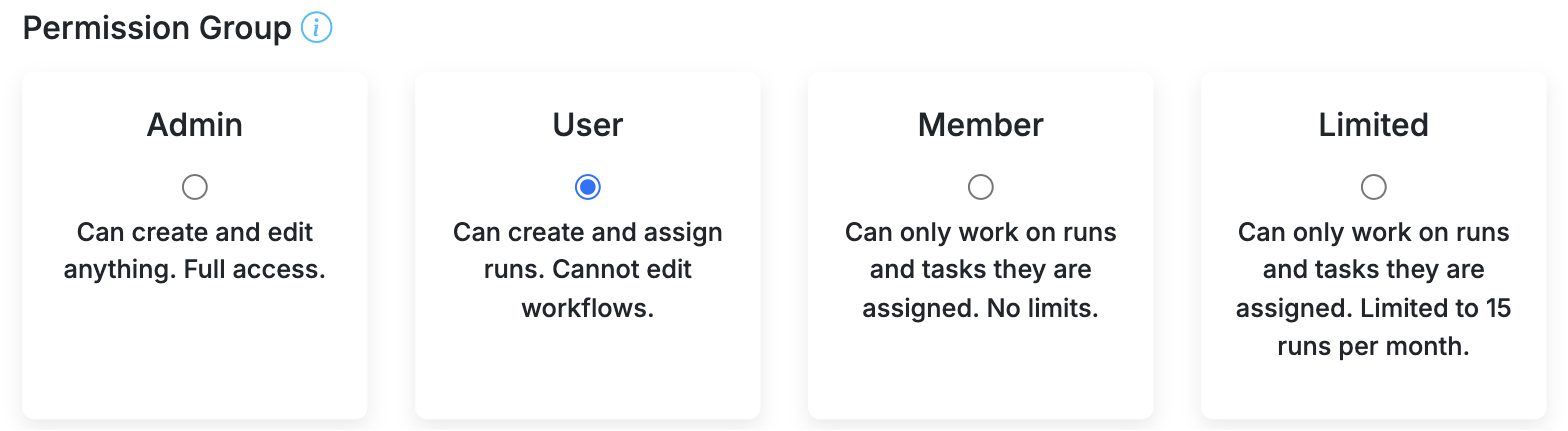
Limited users are free. You can have as many as you like, and they never count towards your subscription. In return, each one can be added to 15 runs per calendar month.
What a Limited user can do
- See the runs they have been added to, and complete steps, fill in data fields and leave comments on them.
- Work from the Inbox, which is their home page. Its tabs are Your Runs, Assignments and Notifications, plus Task Lists if your account uses them.
- Change their own name, email, avatar and notification settings.
They cannot open the Workflows, Runs, Team or Reports pages, create runs, or assign steps. Inside a run they see every step by default; turn on Hide all but assigned steps from limited, member, and guest roles in the workflow's settings to show them only their own steps. See What Limited, Member, and Guest users see in a run.
The monthly limit
A Limited user can be added to 15 runs in a calendar month. Adding them to a 16th disables their access to that run, and the department's admins get an email saying so. Their earlier runs stay available, and the count starts again next month. If they need to work on the disabled run now, an admin can change their role to Member: that restores their access to the run straight away, and Members have no monthly limit.
The limit applies only to people whose only roles in your account are Limited. Someone who is an Admin, User or Member in any department is never limited with respect to the number of runs, whatever their role elsewhere. Changing a Limited user to any of those roles lifts the limit at once and restores access to any run it had disabled.
Limited, Member or Guest?
| Limited | Member | Guest | |
|---|---|---|---|
| Works on assigned runs and steps only | Yes | Yes | Yes, one run |
| Runs per month | 15 | No limit | 1 |
| Signs in | Yes | Yes | No, uses a link |
| Counts as a paid seat | No | Yes | No |
Members have exactly the abilities of a Limited user with no monthly cap, and are paid seats. Guests are for outside people who need a single run; see Guest Users. For Admins and Users, see Managing Users and Their Permissions.
Make someone a Limited user
Roles are set per department. When you add a person from Team, the Team Member dialog shows the four Permission Group cards; choose Limited. To change an existing person, open the department's People list and pick a new role from the dropdown beside their name. The change takes effect immediately.
Video walkthroughs
What Limited and Member users see after signing in:
How Admins, Users, Members, Limited users and Guests differ: